A clearer help centre, tidier maths activities, and two games for every Grade 2 to 4 skill
Three changes landed together: ten plain-language guides for parents and teachers, a topic-then-grade filing system for 1,682 maths activities, and at least two games for each of 381 skills in Grades 2 to 4.
Only one of these changes how the app looks today, but all three exist for the same reason: so that when you or your child need something, it is easy to find and there is more than one way in. Here is each in turn.
A help centre written for families
If you have ever opened a website's help section and found technical notes written for someone else, you will understand why we rebuilt ours. The help area used to mix two very different kinds of reading. Some pages were meant for you: how to get started, what a level means. Others were working papers written for the people building the site. A parent asking "how do I move my child's progress to another device?" should not have to wade through either architecture decisions or curriculum notes. So we separated the two, and gave the first kind the care it deserves.
It is now a library of ten short guides, written in everyday language with no jargon:
- Getting started, for the first visit.
- Choosing a level, for deciding where your child should begin.
- How activities work, so you know what your child is doing and why.
- The printable mental maths sheet, our one-page daily warm-up.
- Reading progress, to understand what the progress display is telling you.
- Saving and moving progress, for switching device or browser.
- Switching language, between English and French.
- Privacy at home, what the site does and does not do with your family's information.
- Using the site in class, for teachers working with a group.
- Troubleshooting, for when something does not behave as expected.
The guides are grouped by topic, so related questions sit together. A search box at the top narrows the list as you type: try "language" or "progress" and only the guides that mention it remain. Every guide shows an estimate of its reading time, so you can tell at a glance whether you have a minute or need a coffee break. At the bottom of each one, previous and next links let you read the whole library in order, like a short handbook, or hop to the neighbouring topic.
Help
 +-- Search box
 +-- Getting going
 |     Getting started -> Choosing a level -> How activities work
 +-- Everyday use
 |     Mental maths sheet -> Reading progress -> Saving and moving progress
 +-- Setup and safety
       Switching language -> Privacy at home -> Using the site in class
       -> Troubleshooting
The internal documents, such as architecture decisions and curriculum working papers, are still on the site, and anyone with the address can open them. But they are now marked as not meant for search engines and have been taken out of the list of pages we offer them, so a parent will no longer stumble on them in search results by accident. That list now points to the guides and the articles instead, which is what we would like people to find.
The blog front page changed as well. It now has two shelves: Guides for parents and teachers, and Project news, which is where posts like this one live. Each post shows its date, its level and its reading time, so you can pick what suits you without opening everything.
Privacy has not changed. The new privacy guide describes the same things as the Privacy page, only in friendlier words and from the point of view of a family at home. While we were in that area, we also checked something for visitors in Quebec. The site gives people in certain regions a consent-first experience by default, meaning optional features start switched off until the visitor agrees. We confirmed that Quebec, and Canada as a whole, were already on that list before today. What we added is a test that proves it, so if anyone ever changes the list by mistake, the check will notice.
If your help area still looks the old way when you read this, the update has not reached your version of the site yet. We would rather say so plainly than leave you wondering why the page described here is not the page in front of you.
Ten guides will not answer every question. If you find a gap, that is useful to know: it tells us which eleventh guide to write.
Every maths activity gets a home: a topic, then a grade
Behind the scenes, our maths activities are moving into a tidier filing system. All 1,682 of them are being grouped by topic and then by grade, so "Number sense, Grade 1" becomes a place we can point to rather than a list we have to search.
Until now, every activity sat side by side in one enormous drawer. To find the Grade 1 number-sense games you had to look them up in a separate index. That is fine for a handful of activities and tiring at well over a thousand. We now file each one the way a school would.
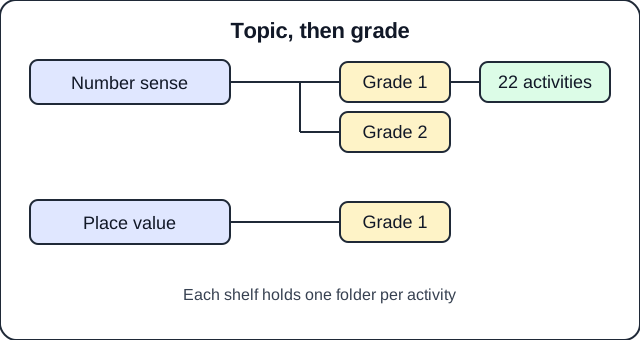 Topic first, then grade. The first shelf we filled holds 22 activities.
For children, nothing changes. An activity keeps its name, its questions, its English and French wording, and the way it is linked to the skills it practises. Progress and scores are untouched, and the pages in the app look the same.
We are not moving everything in a single weekend. Activities move one topic and grade at a time, and the old drawer and the new shelves work side by side until the last group has moved, so the app keeps running normally and each move can be checked on its own. The first group is our pilot: 22 Grade 1 number-sense activities covering counting on and back, skip counting, number words, comparing and ordering numbers, and estimating.
Moving things around invites a classic mistake: the same activity ending up in two places. Our checks now watch for it. If one activity appears both in the old drawer and on a new shelf, it is flagged as a problem to fix instead of one copy quietly winning. The checks also confirm that the total number of activities is the same before and after every move, so nothing goes missing.
You will not notice any of this today. Over time, adding new activities for a given grade and topic becomes quicker and less error-prone, and future topic and grade pages in the app can be built from this structure. A new activity placed on the right shelf is picked up automatically.
Every Grade 2, 3 and 4 skill now has at least two games
This is the change your child can feel. Open any Grade 2, 3 or 4 maths skill in the app and you will find at least two different activities to practise it, in both English and French. Across the three grades, that is 381 skills, and not one is left with a lone exercise or an empty page.
Why two, not one? A child who gets stuck on a skill, or simply gets bored, used to have one way to practise it. If that activity did not click, there was nothing else to try. With two behind every skill, a child can switch to a different way of seeing the same idea, and a parent or teacher can choose the one that suits the child better.
| Grade | Skills |
|---|---|
| Grade 2 | 120 |
| Grade 3 | 138 |
| Grade 4 | 123 |
| Total | 381 |
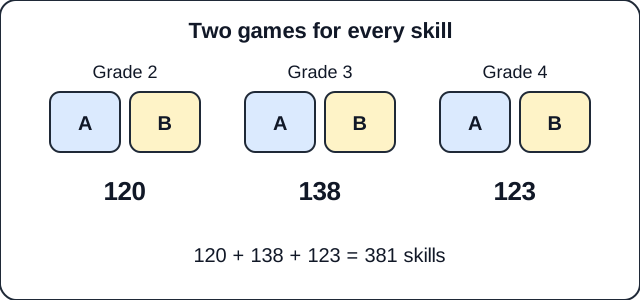 Two games, A and B, behind every skill.
Behind those 381 skills sit 775 different activities. Many activities serve more than one skill, which is why the number of links between skills and activities, 922, is higher than the number of activities themselves. Every one of the 775 is available in English and in French.
We did not simply count the same game twice. For a skill to count as covered, it needs two genuinely different built activities, not one activity listed two times. A child working on a skill meets two different tasks, not the same questions in two places.
Nothing changes about how activities look or score, and the history of skills your child has already practised stays as it was. What changes is the choice on offer once a skill is opened.
At home, you can now say "let's try a different one" on any Grade 2 to 4 skill and always have somewhere to go. In class, you can offer two routes to the same skill, a quick warm-up and a deeper practice, and rely on both being there in the language your class uses.
There is more to do. Other grades and topics will get the same treatment, and we will keep looking at how well each activity serves the skill it is attached to. For Grades 2, 3 and 4, the basic promise is now kept for every skill: at least two playable activities, in English and in French.