Place value from the ten-frame to Grade 6, and progress that survives export
Kindergarten now teaches numbers to 10 on a ten-frame, Grade 1 has ten new place-value games, and a child's progress now comes back exactly as exported.
Place value is the idea that in 47 the 4 means four tens and the 7 means seven ones. Most of what we built this week is about helping children see that, one small step at a time, starting with a grid of ten boxes. We also fixed a problem that could make a child's report look different after an export and import.
Kindergarten: one skill, done well
Kindergarten place value used to have three skills. Two of them were really Grade 1 ideas: building teen numbers as a ten and some ones, and bundling ten ones into one ten. Building a teen number is the same idea as building any two-digit number from tens and ones, so it now lives with those skills, along with the towers activity that shows it. Bundling is covered by the first Grade 1 skill, which becomes the starting point.
What stays in kindergarten is a single skill: showing the numbers up to 10 on a ten-frame. That is the small grid of two rows of five boxes, and it is a picture many teachers lean on because the structure never changes. Five fills the top row. Seven is a full top row and two more below. The empty boxes tell you how far you are from ten.
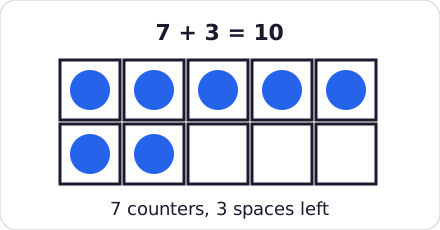
Seven counters leave three spaces, so 7 + 3 = 10.
Three games practise it.
| Game | What the child does |
|---|---|
| Fill the frame | Adds counters until the frame matches the number shown, then says how many spaces are left. |
| Flash and tell | Sees a frame with some counters for a moment, then picks the number. This game was reworked. |
| Make ten friends | Pairs two frames so that together they fill all ten spaces. |
Each game starts small, with 1 to 5 counters filling the top row, and grows towards 10 and towards less usual arrangements. A child who can name a pattern at a glance, rather than counting dots one by one, is building the habit that later makes adding and subtracting feel easier.
For now these games are text-based and keep things simple. Animated counters, hearing the count read aloud and a "show again" button are planned for a later update.
At home. Draw a ten-frame on paper, or use an egg carton cut down to ten boxes. Put some coins or buttons in it and ask "How many? How many spaces are left?" before your child counts. If they can say it without pointing, they are seeing the number, not just counting it.
Grade 1: ten new games for tens and ones
Right after the ten-frame, Grade 1 children now have a full path through tens and ones. The list reads in the order children usually meet the ideas, each skill has a clearer title, and each has two games.
| Skill | Games |
|---|---|
| Ten ones make one ten | Bundle the sticks (group loose sticks into tens); Ten-frame trade-up (fill a frame, swap it for a ten-rod) |
| Whole tens, 10 to 90 | Tens on the hundred-square (hop by tens); Ten-rod shop (buy rods, count the cubes) |
| Build a 2-digit number | Build it with blocks (make the called number); Teen towers (a ten-rod plus loose cubes makes 11 to 19) |
| Name a number from its blocks | Read the blocks; Place-value mat flip (flip the tens and ones cards) |
| The value of each digit | Digit value detective (is the puppet right about what a digit is worth?); Swap the digits (which number is bigger now?) |
The ten-frame trade-up is the link between the two grades: a full frame is swapped for a single ten-rod. The shop replaces an older, plainer activity, and one older, overlapping Grade 1 activity was replaced by the new bundling and hundred-square games. A child's earlier progress on it carries over. The kindergarten game that shows teen numbers also works as an extra for the building skill.
The last skill is where a child has to think hardest. The puppet makes a claim, such as the 4 in 47 being worth 4, and the child decides whether it is right. In the second game the child swaps the two digits of a number and sees which number is bigger now.
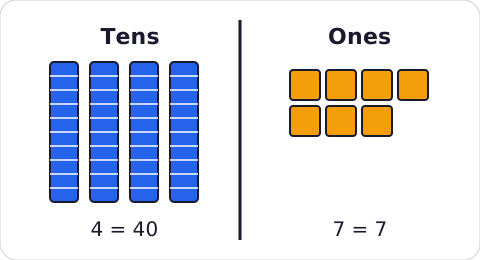
In 47, the 4 is worth 40 and the 7 is worth 7.
One skill, showing a number such as 43 as 3 tens and 13 ones, has moved to Grade 2, where it sits next to similar ideas.
At home. Count out 30 or so lollipop sticks or dried beans and ask your child to make bundles of ten with elastic bands. Then ask for a number like 24: how many bundles, how many loose ones? Ask them to point to the 2 and tell you what it is worth.
Grade 2 and Grade 6
The same idea now continues past the first grade. In Grade 2, children work with numbers up to 1 000. They see that 352 is 3 hundreds, 5 tens and 2 ones, trade a hundred for ten tens, and practise adding or taking away 10 and 100 in their head. Seven skills and about a dozen new games cover this, including a trade mat for blocks, a hundred chart where children move by tens, and an odometer that rolls over by hundreds.
In Grade 6, children meet significant figures and standard form: deciding which digits in a number really count, rounding to a chosen number of significant figures, and writing very large numbers such as 4.5 × 10⁶. Each has its own set of games.
How a level works
Every game uses the same rule as the rest of the app: get 8 out of 10 right with at most two hints, and the next level opens. Questions are generated the same way each time, so a child can retry and see the same kind of problem. Everything comes in English and French together, including a corrected French sentence in the teen towers feedback.
We also rewrote the explanation under the place-value pages for every grade from kindergarten to Grade 6. It now says what children are learning at that grade and how to help at home, instead of repeating a general paragraph.
Progress that survives an export
A parent who exported a child's progress, deleted the profile and imported the file again could find the report looking different from before. That is fixed.
What was wrong. Practice results used to be kept in two separate places on the device. The report read from one, and the export file was built from the other. Each kept a slightly different amount of history, so a round trip could quietly drop answers, and the scores shown afterwards did not always match.
What changed. There is now a single store for each child's answers. The report, the mastery percentages, the radar chart and the activity scores are all drawn from it, and the export file is made from the same data.
practice -> one progress store -> report, radar, scores
                              \-> export file -> import -> same store
For each skill, grade and activity, the app keeps the 50 most recent answers. This is a fixed rule, so exporting and importing never changes what is kept.
If your family already uses the app. Progress saved before this update is carried over automatically the first time the app opens, and the old copy is removed only once the move has fully succeeded. Older export files, from every earlier version, still import.
Deleting and importing are safer. Deleting a child now removes all of their progress, so a new profile starts clean. If an import fails part-way, no half-restored child is left behind, and a clear message in English or French explains what happened.