Fewer number skills, a report card you can open up, and tidier addresses
The pre-school Numbers topic went from 22 skills to 12, the parent progress report now opens level by level, and subjects, topics and skills share one look.
Twelve number skills instead of twenty-two
Open the pre-school Numbers topic and you used to meet 22 skills. Many of them were the same skill at a different size: counting to 10 and counting to 30, giving 3 blocks and giving 12, reading numerals up to 5 and up to 20. If you were scrolling that list to see how your child was doing, you had to work out which entries really differed. Most did not.
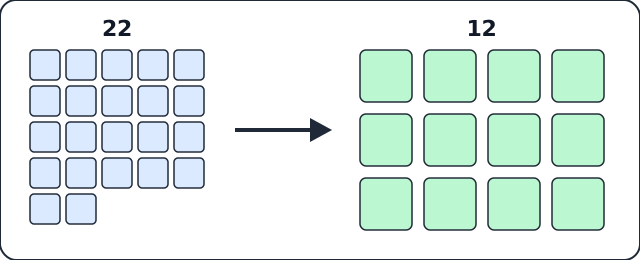
The Numbers list before and after.
Now there are 12. Nine of them each gather two or three of the old skills:
- Count in order
- Count a set
- Count from any number
- Next, before, one more, one less
- Give and take a number
- See it at a glance
- Read numerals
- Compare groups
- Compare and order numerals
Three stay on their own, because they are genuinely different ideas: Write numerals, Zero and Ordinals. Zero is the idea of "none". Ordinals (first, second, last) describe position, not quantity. Folding them into something else would have hidden what makes each one its own.
Nothing was lost in the merge. The activities did not change. A merged skill simply lists all the activities of the skills it absorbed, and each activity keeps its own score. The skill shows as passed once all of those parts have been passed, so a child cannot tick it off by being good at the easy end alone. Everything is available in English and French, and the progress your child had already made is kept exactly as it was.
At home, the shorter list makes a good conversation starter. Pick one skill, say Compare groups, and look together at which of its activities your child has played and which they have not.
A report that opens up, level by level
The progress report on the parent page used to give one overall percentage and two short lists. That told you how things stood, but not where to look. Now each subject opens into its topics, each topic into its skills, and each skill into the activities your child actually played. There is a percentage at every level.
It starts compact: the subject, its score, and its topics. Tap a topic to see its skills. Tap a skill to see each activity's own score, or "not played yet" for one that has not been tried.
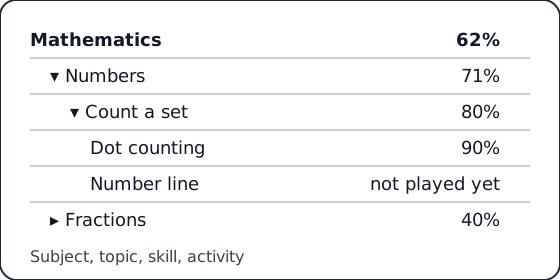
One path through the report, from the subject down to a single activity.
Read that example from the top. Mathematics sits at 62%. Numbers, at 71%, is pulling it up, while Fractions, at 40%, is the place to look. Inside Numbers, Count a set is at 80%, and the reason is plain: Dot counting is at 90%, and Number line has not been played yet. You do not have to guess which activity to suggest at the weekend.
Two buttons, Expand all and Collapse all, open or close everything at once. Every row also opens on its own, so you can follow one topic without scrolling through the rest.
The numbers are the same ones your child sees in the syllabus, in English and French. Only skills the app can score are listed, so you will not find rows with nothing behind them. While no grade is set, the report shows all grades.
Subjects, topics and skills now look alike
The three levels of the Mathematics section used to feel like three different apps. Now the Mathematics card on the home page, each topic card inside a grade, and the topic page itself all show the same small scoreboard. It tells you how many skills are passed, how many are still to do, and how many there are in total, with a progress bar underneath. Learn it once and you can read all three.
Topics got a face. Every topic, whether Numbers, Place value, Fractions, Time, Money or one of the others, now has its own colourful banner and a one-line description, in English and French. Fractions, for example, reads "Halves, quarters and other equal parts of a whole." For a child who cannot yet read the topic name fluently, the colour and banner give something to hold on to.
The list of topics has the same search box and the All / Passed / Not yet buttons you already knew from inside a topic. That means finding "what still needs work in Grade 2" takes one tap. Inside a topic, the title is now a proper card with a small banner, the description and the scoreboard. The redundant "All topics" button is gone, since the menu bar at the top already takes you back.
Web addresses that read like a path
A skill's web address now follows how you got there. Going from the grade, to the topic, to one skill, to that skill's activities, to a single activity, each step adds one piece to the end of the address:
| You are on | The address adds |
|---|---|
| Grade 1 topics | the grade |
| The Numbers topic | the topic name |
| One skill | the skill name |
| That skill's activities | "activities" |
| One activity | the activity name |
Chop off the end of any address and you land on the page above it. This helps if you share a link with a teacher or a grandparent: the address tells them roughly where it leads before they click.
One catch. Old Mathematics addresses with "syllabus" or "activity" in the middle no longer work. A bookmark made before today will show the "page not found" screen. Go through the grade and topic once and bookmark again.
Pre-K activities start to look like games
We went through every activity with a simple question: does the child do the skill, or just read a sentence and pick a button? "Count in Order" passes. Many others did not.
Today the first 24 Pre-K and Kindergarten activities were rebuilt around pictures instead of words. You will find flash dots, "which row has more?", "is zero a number?", ordinal positions like "first" and "last" in a queue of animals, solid shapes matched to real objects, and ten-frames for the teen numbers, among others.
What changed for a child is easy to see. Groups of objects are drawn on screen and can be tapped. There is a "same" button for when two groups match. Zero is shown as an empty dashed spot that a child can actually touch.
Wrong answers now get a short, kind hint aimed at the usual mistake, instead of just "try again". A spread-out row only looks bigger, for example, and the hint says so. Each activity has several levels and plenty of different questions, so a child no longer sees the same one twice in a session. Everything is in English and French together.
A few of the nicest touches are still to come: a counters row that moves and hides, tracing numerals, and drag-to-link for solids. They need new play scenes, so they are planned for the next rounds. The remaining Pre-K activities follow in later batches.